Chapter E - Embedded Systems
I would like to give most of the credits to professor Nicolas Lacaille, who has been the best Embedded System teacher I have known and taught me all I know on embedded systems to this day.
What are embedded systems?
Embedded Systems are specialized computer systems with specific characteristics:
- Small in size
- Low power
- Efficient usage of PCB space
- Mostly uses microcontrollers (also known as MCU for microcontroller unit)
- MCUs are
- Small CPUs with many support device built into the chip
- Either low power for specific applications, or high performance in multiple applications
- MCUs are
- Typically interact with physical elements and often have real-time computing constraints
How to select a microcontroller?
To have your software application fulfilling the goals you set it to do, you first need to select the correct hardware that will enable the software to run and achieve its goals.
The selection criteria you need to think about when selecting a microcontroller for your application are:
- Power Consumption
- Peripherals
- Performances
- Price
After you chose your MCU, you either need to build your own PCB for your development or purchase an existing development/evaluation board. And you always need to make sure you can Flash and Debug your MCU with the given PCB.
Embedded development
Software tools
In order to develop the software you want to run on your embedded system, you will need a set of specific tools.
Cross (platform) toolchain
As a mean to translate your code into the target’s MCU, you will need to have a cross-compiler as well as a cross-linker for your desired programming language. C and C++ are the most commonly used embedded programming languages nowadays as they are very close to the underlying hardware and memory layout. However, given the recent interest to cybersecurity and developer’s convenience, the Rust programming language is gaining interest in the area (Resources for embedded Rust: the book - List of tools).
Simulator
In order to test your application before sending it to the real hardware, one can use a simulator or emulator.
QEMU
QEMU is an free and open-source (FOSS) generic emulator and virtualizer.
This course will not go through the usage of QEMU os it is a too broad of a topic, however if you would like to know more about it, feel free to check those resources: QEMU documentation - Rust program emulation with QEMU.
Wokwi
Wokwi is a paid simulator for a limited number of embedded development boards.
Flash tools
For your code to be transferred into the target’s MCU, you will need a flash tool. This tools transfers the program’s binary into the on-board memory of the MCU.
Debugger
When running programs on the target platform, you might want to inspect and control the execution of the program you are running in order to detect and correct bugs. Some tools called debugger, let you run step by step, stop the program at specific lines of code called breakpoints, or check and modify variable values at runtime.
To debug an MCU you will need a toolkit that lets remotely debug a chip, some well known toolkit in Rust are:
- OpenOCD + GNU Project Debugger (GDB). This is the most known kit and is mainly used for C application development.
- Probe-rs. A new player in the game, made in Rust and for Rust, aims to increase simplicity and ease of integration.
For your debugger to connect to the remote chip, you will also need a hardware probe. Most common probe protocols are JTAG and SWG, and commonly used probes are: ST-Link, J-Link, CMSIS-DAP.
Integrated Development Environment (IDE)
To develop our software application we will need an IDE to write code, as well as to interact with the debugger for convenience (it is also possible to use it from the terminal, but setting break points visually and having the executed line highlighted is speeding up things quite a lot).
For this purpose you can use any IDE that integrates with the debugger of your choice. Some good IDEs:
- Visual Studio Code (the VsCodium version is open-source and telemetry-less)
- VIM (or NeoVIM)
- Emacs
- Helix
Compilation
Compilation is the process to convert your source code into machine readable language that will be executed by the target processor.
To learn more about compilation there is tons of resources out there, I have made the choice not to go deeper into the subject and instead give summarized diagrams because as we know, a picture is worth a thousand words (and I am terribly lazy and do not have the time to talk about this topic in detail).
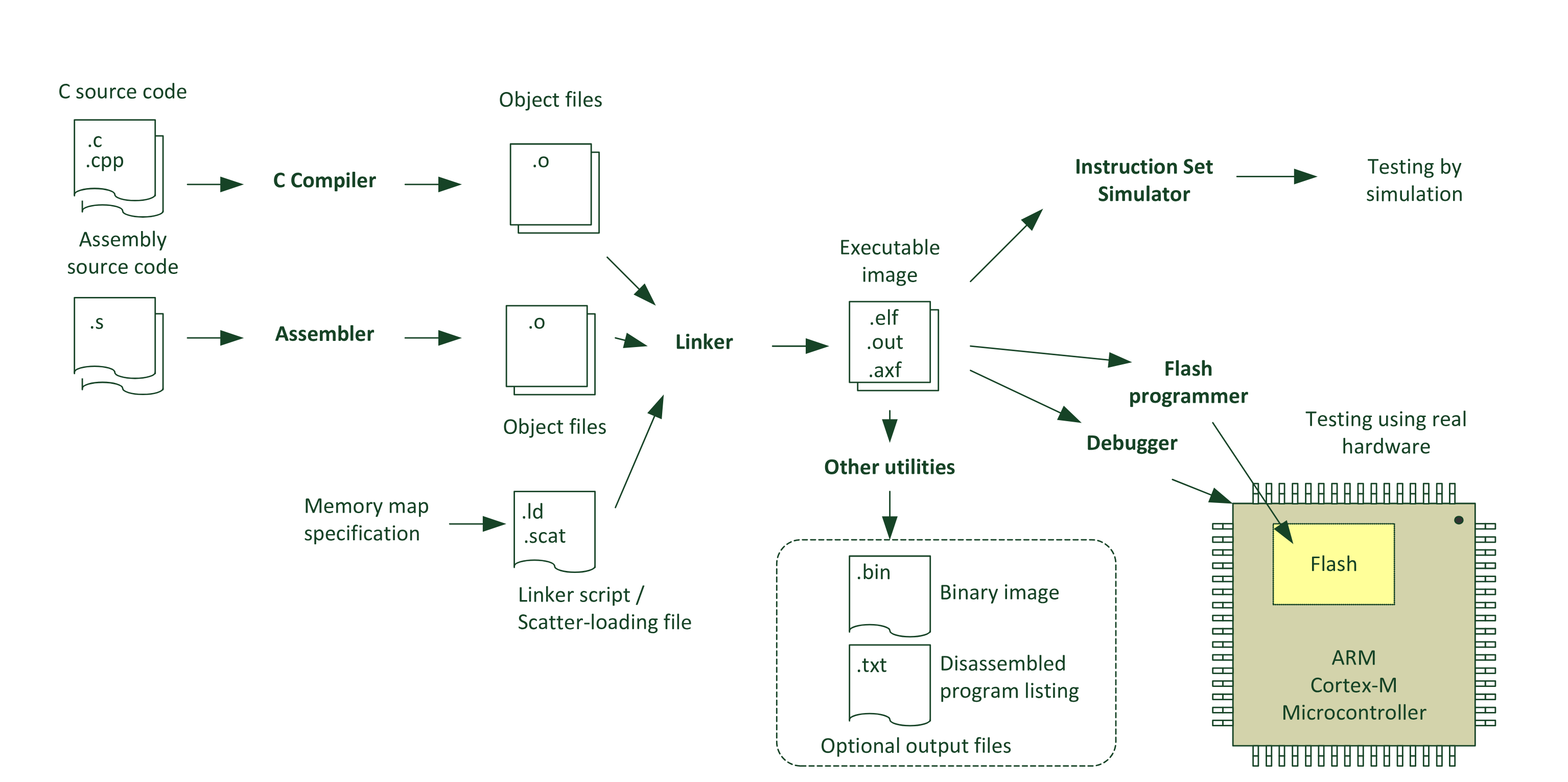 Common Compilation flow - The Definitive Guide to ARM Cortex -M3 and Cortex -M4 Processors
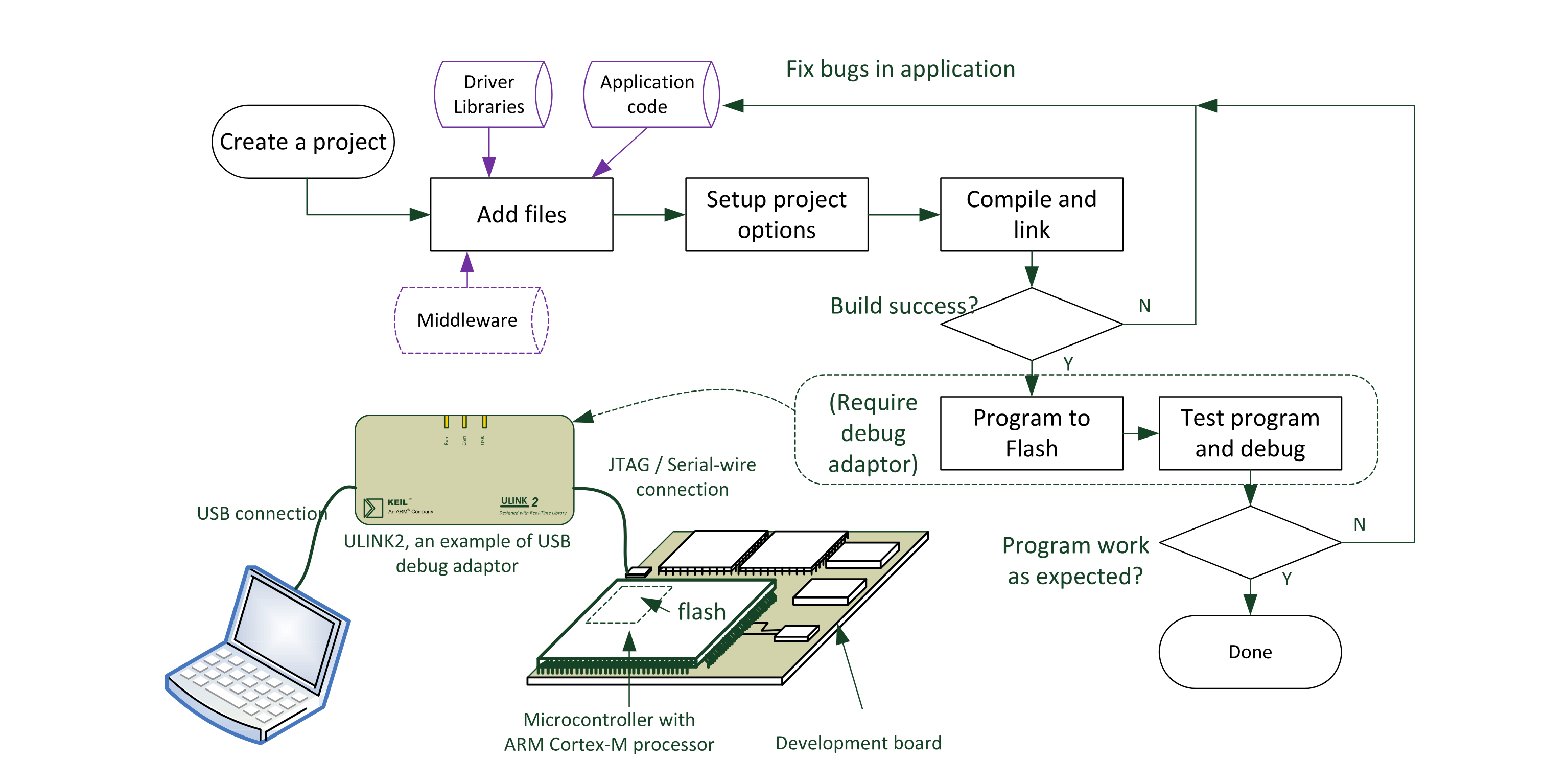 Embedded Software Development Flow - The Definitive Guide to ARM Cortex -M3 and Cortex -M4 Processors
Additional resources
There is lots of available resources online to complete the knowledge necessary in this domain and for specific application. Here is a non-exhaustive list of useful resources you might need on your embedded-system journey:
- ST Application Notes (AN) for STM32 development. (Example: AN2867 for oscillator choice).
- Analog Devices courses
- More Analog Devices courses
- List of Analog Devices courses